
 By
What is the DDS reference number?
It is the unique code the EUDR information system (TRACES) assigns to every accepted due diligence statement. It identifies the DDS in everything that follows: the customs declaration, your invoices to customers, checks by the competent authority and your own due diligence file.
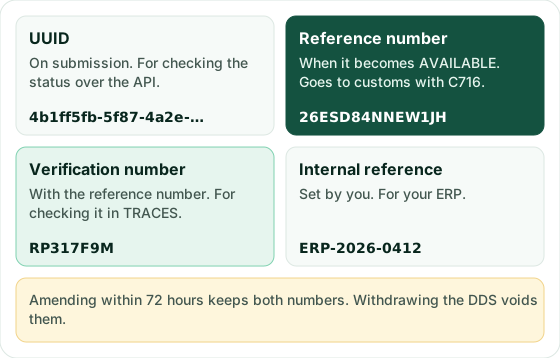
You do not choose it, and it does not exist until TRACES has finished its analysis. When you submit, TRACES first returns a UUID; the reference number comes when the DDS moves to AVAILABLE. A DDS carries four identifiers, and they are easy to mix up:
| Identifier | Example | Who sets it and when | What it is for |
|---|---|---|---|
| UUID | 4b1ff5fb-5f87-… | TRACES, on receipt | Checking the status over the API |
| Reference number | 26ESD84NNEW1JH | TRACES, when it becomes AVAILABLE | Customs (code C716), customers, authority |
| Verification number | RP317F9M | TRACES, together with the reference | Letting someone else check the DDS in TRACES |
| Internal reference | ERP-2026-0412 | You, when submitting (optional) | Finding it in your ERP or in Sourevo |
The examples in this guide are real numbers issued by the TRACES test environment. They have no legal value.
And the verification number?
It is a security code TRACES assigns at the same time as the reference number. The Commission's documentation calls it a number that ensures additional security of the data: someone who only has the reference number cannot look the DDS up; both are needed together.
That is why the verification number travels with the reference number whenever the DDS leaves your company for someone who has to check it, such as a customer who will rely on it. Customs only needs the reference number.
Sourevo submits it for you in TRACES. Try it free for 14 days, no card needed. Try it free for 14 days
What format do the numbers have?
The Commission does not publish a fixed format. The API schema only says that the verification number is between 5 and 35 characters long. This is what we saw in every test we ran in the acceptance environment:
- Reference number: 14 characters, capital letters and digits, starting with 26ES (for example 26ESD84NNEW1JH). Our test operator is Spanish; another country or another year may change the beginning.
- Verification number: 8 characters, capital letters and digits (for example RP317F9M).
If your software stores or validates these numbers, do not hard-code a pattern: keep the text exactly as TRACES returns it and compare it without spaces. Always paste them rather than typing them: with these characters it is easy to confuse O with 0 and I with 1.
When does TRACES issue them?
In two steps. When you submit, the DDS is SUBMITTED and TRACES only returns the UUID. It then runs its automated risk analysis and, if all is well, moves the DDS to AVAILABLE with both numbers.
In our tests in the acceptance environment it took about a minute for small statements and about three and a half minutes for one with 539 polygons. The API documentation recommends waiting at least an hour before asking for the number over the API, because it may not be available straight away. In production, plan for that margin and do not submit on the morning your customs broker needs the number.
There are two cases where the number takes longer or never comes:
- Authority review (Article 17). If the analysis profiles the DDS as high risk, it waits for a manual review. The API's referenceNumberInfo field says so ("Under Competent Authority review") and the number is only released once the review ends.
- Rejection. If the DDS fails validation it ends up REJECTED, with no number. You fix the data and submit a new one.
If TRACES is down for more than 60 minutes, the competent authority or customs can generate a contingency reference number, which is replaced by a system number once TRACES is back.
Who needs which number?
It depends on what they will do with it:
| Who | What they need | What for |
|---|---|---|
| Customs | Reference number | Declaring it with document code C716 in the import or export declaration (Art. 26(4)) |
| Downstream operator or trader buying from you | Reference number (and verification number if they will check it) | Keeping it for five years as proof that the product already has a DDS |
| Whoever groups your DDS into theirs | Both numbers | TRACES requires both to match an available DDS |
| Competent authority | Reference number | Finding the DDS during a check |
| Your team | UUID and internal reference | Following the status and matching it to the order |
Since Regulation (EU) 2025/2650, downstream operators and traders no longer submit a DDS: they collect and keep, for at least five years, the supplier's details, the DDS reference numbers (or the simplified declaration identifier) and the buyer's details. The detail is in the guide on downstream operators and traders, and what goes in the customs declaration in the guide on customs and TARIC codes.
How do you check a DDS with its two numbers?
In the TRACES web interface, not over the API. In version 4 of the API, the operation that looked a DDS up by reference and verification number (getDdsByIdentifiers) always answers "not found": the Commission removed content retrieval from the API. In TRACES the steps are:
- Log in to TRACES with your EU Login and open Documents > EU Deforestation.
- Click "Verification", enter the reference number and the verification number and click "Verify".
- TRACES answers VALID (it exists and is available), NOT VALID (it exists but has been withdrawn, rejected or grouped into another) or NOT FOUND (it does not exist or a number is wrong).
- Download the PDF of the result and keep it in the file of the DDS that relies on it.
If you have many, the "Referenced Statements" tab of a TRACES DDS draft takes up to 2,000 at once. In Sourevo you record both numbers on the DDS and upload the result and the PDF: they stay in the due diligence file for five years.
What about grouped statements (GROUPED status)?
Grouping means creating a new DDS that references others already submitted, through their reference and verification numbers. The TRACES documentation describes it like this: the grouped declaration gets its own reference number, inherits the geolocation of the referenced ones and represents them for compliance purposes. The referenced statements move to GROUPED.
Three rules worth knowing before you group:
- The referenced statements must be available (AVAILABLE or archived) and both numbers must match. A DDS cannot reference itself, and up to 2,000 fit in one statement.
- A GROUPED DDS cannot be amended or withdrawn while the grouping statement is active.
- References are only set at submission. If an amendment carries them, TRACES answers EUDR-GROUPING-NOT-ALLOWED-ON-AMEND.
In API V4 the references go in the groupedDeclarations block. Micro or small primary operators in low-risk countries have no reference number: their simplified declaration carries a declaration identifier, which plays the same role along the chain and at customs.
A worked example
Example Coffee Ltd (a fictitious company) imports 19,200 kg of green coffee from Colombia, CN 0901 11 00, from 12 plots of two cooperatives. This is how the numbers come in and go out:
- Monday, 10:02. It submits the DDS with internal reference ERP-2026-0412. TRACES leaves it SUBMITTED and returns the UUID.
- Monday, 10:04. The DDS becomes AVAILABLE with reference number 26ESD84NNEW1JH and verification number RP317F9M.
- Monday, 11:30. Its customs broker declares code C716 with 26ESD84NNEW1JH in the import declaration.
- Tuesday. It sells 6,000 kg to a roaster in Lyon. The invoice shows both numbers; the roaster keeps them for five years and can check the DDS in TRACES.
- Wednesday. One plot had the wrong producer name. Since 72 hours have not passed since AVAILABLE, it amends the DDS: TRACES analyses it again and keeps the same two numbers.
Had the mistake been spotted on Friday, outside the 72-hour window, it would have needed an extension from the competent authority or a new DDS with new numbers. How that window works is in the guide on amending or withdrawing a DDS.
Which mistakes do we see most with these numbers?
- Passing on the UUID instead of the reference number. The UUID is no use at customs or for anyone checking the DDS.
- Giving a customer only the reference number. Without the verification number they cannot check it in TRACES.
- Using the number of a withdrawn DDS. Once withdrawn it no longer counts; if the goods move on, they need another DDS.
- Typing it by hand and confusing O with 0 or I with 1. TRACES answers NOT FOUND and the DDS seems not to exist.
- Counting on the number before the DDS is AVAILABLE. While it is SUBMITTED there is no number yet.
If you submit from Sourevo, both numbers come back to the DDS page as soon as TRACES assigns them, with nothing to copy from the web. The step-by-step submission is in the guide on submitting the DDS in TRACES.
Frequently asked questions
- Which number goes in the customs declaration?
- The reference number, with document code C716. The verification number is not declared at customs.
- Does the reference number change when I amend the DDS?
- No. Amending within 72 hours of it becoming AVAILABLE keeps both the reference and the verification number; we checked it in the TRACES test environment.
- Can I choose the reference number?
- No, TRACES assigns it. What you can set is your internal reference, which helps you find the DDS in your own system and over the API.
- Does the reference number expire?
- It has no expiry date, but it stops counting if the DDS is withdrawn, rejected or becomes obsolete. That is why it is worth checking a supplier's DDS in TRACES before relying on it.
- Can I look up a DDS over the API with its two numbers?
- No. In API V4 that query always answers "not found". Over the API you only retrieve your own statements, by UUID or by internal reference; other people's are checked in the TRACES web interface.